Thursday, February 7, 2008

New Tech Means Better Looking CD's and DVD's

You've just spent weeks putting together your favorite vacation or other videos. Or maybe you've created what you think is the greatest music compilation CD of all time. Or you want to add your resume, photos and other information to an audition CD. Or distribute copies of a presentation you've made to a corporate board.

It's occasions like these where grabbing the trusty Sharpie to scribble a title and some information on a burned CD or DVD just isn't enough.

In the past, CD labeling systems usually involved sticky labels and some sort of clumsy application system. If you managed to get the label printed right, getting it applied flat to a CD or DVD wasn't always easy. Then one day in heat or humidity would start to peel the label, which could in turn gum up whatever player tried to digest it.

Fortunately, a new generation of labelers is out there that offers permanence and professional-looking results. If you spend a little time experimenting and trying out different options, you can produce CD's and DVD that have labels worthy of the content inside.

One system that is gaining popularity is LightScribe, developed by HP. LightScribe uses special CD and DVD blanks. After data is burned to the recordable side of the blank, the disc is then flipped over, and the laser is able to burn a silkscreen-style pattern into the LightScribe side of the disc.

The printable side of the disc can contain text, images, designs, or a combination.
For example, you can capture a frame from the video on the disc as a picture, and then add it to the LightScribe label as a background. Add title, date and any other iformation, save the file, and then print the LightScribe label.

Three shades of darkness are available, the longest of which takes 15-30 minutes to produce a completed disc label image. Lighter shades burn faster.

Because of the way LightScribe works, the images and text do not smear or degrade, and there is no ink to buy, only the proper LightScribe blanks.

LightScribe works best with high-contrast black and white images, and most digital photo programs have an option to convert an image to black and white, as well as contrast and brightness controls.

Grayscale images are all that LightScribe can produce, although blanks now come in different background colors to add some variation.

Costs for these blanks have been falling as more manufacturers have started selling LightScribe, to where CD and DVD blanks can be had on sale for as low as 50 cents per piece.

If you don't have a LightScribe drive built into your system (many newer PC's do), fast USB 2.0 external burners are available for as low as $50.

A second system similar to LightScribe is Labelflash. This system also uses a special media to burn text and images to a blue background disc. Because Labelflash isn't as widespread as LightScribe, blanks are harder to find and are more expensive, costing as much as $2. Prices can be expected to fall during 2008 as this newer technology is introduced with more new computers, especially from Gateway.

For those looking for the ultimate results, Espon includes a CD tray and special design and print program with some of its photo and multi-function printers (including the pictured Espon Stylus Photo R280).

Using special printable media, these printers print images and text in full color directly to CD's and DVD's. Epson includes an easy-to-use but powerful design program called Epson Print CD with these printers. The end results are nearly as good, in some cases better, than commercially available CD's and DVD's. Add tray and case inserts and users can produce professional-quality complete packages from a home PC and printer, which cost as little as $100.

Tom Meek is a computer and media consultant working with businesses and individuals on high-tech needs. Another Day In Cyberville is published weekly in print and online via The Gainesville Voice, a weekly publication of The New York Times Regional Newspaper Group. You can reach Tom Meek at adayincyberville@gmail.com.

Thursday, January 24, 2008

Free Programs Help Make The Most Of Digital Photos

These days it's getting harder and harder to find good freeware programs to do some of the most common tasks for many computer users.

One of the areas where there continues to be an abundance of good free programs, however, is in the area of digital photo processing.

One of the first things to check your computer for is to see what photo programs may have been included with the preload of your PC. In many cases, useful programs have been loaded by the manufacturer that are not trialware like so many other PC offerings.

The second place to look is at the programs that came with your digital camera. Again, in many cases, there are solid programs that are included as a part of the software included with most digital cameras.

A third source of excellent programs for digital photography that you may already own are those included with flatbed scanners, or with the very common all-in-one printer/copier/scanner combination units.

Once you've looked for those items, the Web is a great source for more free programs that can be used to process and catalog digital photographs. Here are some worth checking out:

Picasa – This freeware program from Google is one of the most useful and easy to use photo cataloging and processing tools out there. And while it's photo precessing tools are limited in number, they are some of the easiest and most useful ones most home photographers will need.

Although there are plenty of photo album programs out there, Picasa is one of the most useful of any of finding all the pictures on your computer, cataloging them by folder and date, and then presenting thumbnails of a size useful enough to be readily visible.

Once the program has done its initial cataloging, every time you open it it scans your computer again and adds new pictures as they are available. Unlike a lot of other album programs, Picasa doesn't show many computer program-related pictures that are included by the thousands on most computers.

If you think your computer has an image on it that you can no longer find, install Picasa and if it exists, Picasa will dig it out. Picasa also finds most common movie formats and presents a thumbnail of their opening frame as well.

Picasa's photo processing effects include basic exposure controls, film effects, and a very useful fill light feature.

Picasa can also create quick slideshow movie files small enough to e-mail that will play through almost any video player. You can download the program at www.picasa.com.

Another useful free photo program is Serif PhotoPlus 6.0. The program features an interface similar to older versions of the famous Adobe Photoshop program.

An upgraded version of the program can be had for an additional $10. Either can be downloaded at www.serif.com.

A third useful free program is the long-available IrfanView. This program offers a simple user interface for common photo editing features, but also contains many more powerful tools for the photographic pro. Find it at most major Web download sites or via www.irfanview.com.

Finally, for those who really want to get into heavy image editing, GIMP is a free Open Source image editing program that will do almost anything possible with a digital image. You can get the latest version of GIMP with an easy Windows installer via www.majorgeeks.com.

Tom Meek is a computer and media consultant working with businesses and individuals on high-tech needs. Another Day In Cyberville is published weekly in print and online via The Gainesville Voice, a weekly publication of The New York Times Regional Newspaper Group. You can reach Tom Meek at adayincyberville@gmail.com.
Thursday, January 17, 2008

Video Card Upgrades Need Careful Choosing

One of the most common upgrades to a desktop computer is the video card. Most often, it's due to users seeking better performance for gaming and graphics, or a desire to run multiple monitors from one PC system.

However, these choices are often confusing and prone to mistakes, which can lead to frustrated returns to stores and mail order firms and hefty shipping and restocking fees.

The most common mistake made in choosing a video card upgrade is selecting the wrong interface. Many inexpensive desktop computers come with built-in graphics on the system motherboard, but those graphics are often quickly overwhelmed when faced with much more than Web surfing and simple video playback.

Many recent low-priced desktop systems from vendors such as Dell and HP came with onboard graphics, and they also offer a variety of possible slots for upgrading graphics, with many offering only a PCI slot. A few small-form cases also require a “low-profile” card to fit in the case.

There are three choices available for video card upgrade, PCI, AGP and PCI Express. The fact most major video card retailers offer similar looking packaging for many cards makes selecting the correct card even more confusing.

If you're looking to do an upgrade, you need to find out which video interface your system has. This is the slot in your computer where your card will plug in.

PCI slots are available on nearly every computer, but are also the slowest for running gaming and other graphic-intensive applications.

If your system has either an AGP or PCI-E(xpress) interface, be sure to choose a video card that will use that, rather than PCI, as it will provide better performance, often at lower cost. In a future column I'll talk about choices in AGP and PCI-Express cards.

PCI video cards also use slower graphics processors than other choices. Two basic current video card chipset providers are available, NVIDIA and ATI.

In the NVIDIA chipset the choices include the FX5200 and FX5500, and the GeForce 6200 GPU (Graphics Processing Unit). Cards are available with either 128 or 256MB of graphics memory. A good rule of thumb is usually the higher the number of the GPU and the more RAM, the better the likely performance (and the higher the price).

ATI-based cards are generally sold under the Radeon banner by companies including Visiontek, Sapphire, MSI and Best Data/Diamond.

The current Radeon PCI choices are the X1300 and X1550 with either 128 or 256MB of RAM. The ATI cards offer somewhat higher performance than the NVIDIA cards in many cases, but are also more expensive. ATI drivers also often provide fewer choices in resolutions, especially in common 5x3 HDTV capable monitors (such as 1366x768).

It's also important to check the monitor output choices, which vary from card to card. Some video cards, especially the NVIDIA FX5200 and FX5500 series, only come with a standard 15-pin VGA output, and don't have a DVI connector.

Many other cards feature one VGA and one DVI connector, with others including an S-Video or component video output which can be used to hook a computer to a standard television monitor.

Still others include two VGA or two DVI connectors, which can be handy for attaching multiple monitors to one computer.

It's also extremely important to check the size of the required power supply, as a few cards (such as the Diamond x1550PRO), require a power supply well in excess of 300 watts, and can burn up the cheaper power supply found on many inexpensive desktop computers.

PCI video card upgrades can cost from $50 to $150, so be careful to make the right choice.

Tom Meek is a computer and media consultant working with businesses and individuals on high-tech needs. Another Day In Cyberville is published weekly in print and online via The Gainesville Voice, a weekly publication of The New York Times Regional Newspaper Group. You can reach Tom Meek at adayincyberville@gmail.com.

Thursday, January 10, 2008

Good Ideas In Wireless Accessories

Wireless devices have been around for a long time, but in recent years have become both more reliable and more useful. It's worth taking a look at what's out there to see how going wireless can help improve your computing and other high-tech experiences.

Bluetooth Headsets
– One of the best developments in recent years have been Bluetooth headsets, mainly for use with cell phones.

A number of states are mandating that drivers must use a headset if they want to use a cell phone while driving. Having a Bluetooth headset can make a world of difference in minimizing distractions and maximizing safety when it comes to cell use at the wheel.

A Bluetooth headset allows you to accept calls automatically without having to reach for a cell phone. On many headsets audio quality is as good or better than it will be using the phone itself, and the person on the other end of the call will often notice the difference as well.

Optional voice dialing plans available with some carriers and phones also allow users to make calls without using a keypad, which can be extremely useful for those needing to make calls from their vehicles.

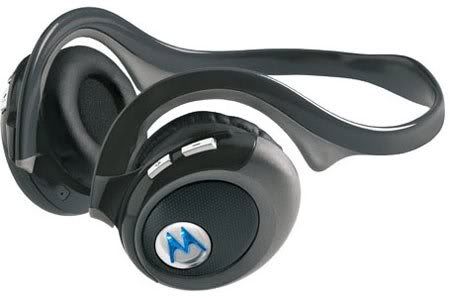
If the phone is used for music playback and is stereo capable, Bluetooth stereo headsets such as the Motorola HT820 provide full stereo while continuing to serve as a phone headset.

Costs of Bluetooth headsets have fallen dramatically over the last year, with discounted units selling for under $25.

Wireless Keyboard/Mouse Combos – Many PC users have gone to using Wireless keyboard and mice over the past few years. The main reason for doing so has been to eliminate the need for cords to be running across desktops and workspaces, and the optical mouse has largely eliminated the need for mouse pads.

However, a somewhat harder to find item can be even more useful – the wireless keyboard containing a built-in pointing device.

The keyboards come in three general types, those with a trackball, others with a joystick that also functions as a mouse, and a few that feature a laptop-style touchpad with mouse buttons.

The trackballs in these keyboards are optical as well, allowing for greater precision and avoiding dirt. Mouse buttons and scroll wheels are located elsewhere on the keyboard, and most normal buttons including volume control, media playback and related functions are also enabled.

On keyboards with a mini-joystick, the joystick functions as either a mouse or a game controller, which can be especially handy for PC gamers who have their PC's hooked up to large monitors in a living room-type setting.

A third style featuring a laptop-style touchpad functions much the same as a laptop keyboard, with touch tapping and mouse buttons.

Many newer HDTV monitors have PC style DVI or VGA inputs, and computers designed for gaming and HD or Blu-Ray high-definition DVD playback are becoming more common. Hooking a PC up to one of these large monitors can make a huge difference, especially for gamers.

Both laptop and desktop computers are also available with Digital TV tuners and TIVO-style capture capability, making the long-touted Media Center PC ever-closer to reality, especially when used with a wireless keyboard combo.

Tom Meek is a computer and media consultant working with businesses and individuals on high-tech needs. Another Day In Cyberville is published weekly in print and online via The Gainesville Voice, a weekly publication of The New York Times Regional Newspaper Group. You can reach Tom Meek at adayincyberville@gmail.com.

Wednesday, January 2, 2008

Latest PDA Phones Make Even Better Choices

It seems like every week there's a new phone on TV being touted for it's high-tech features. However, obtaining most of these phones at the advertised prices requires a two-year commitment with a specific carrier, so choosing the right phone is an important choice.

PDA Phones offering the convenience of a PDA/Mini-Computer continue to expand choices and features. There are a bewildering variety out there, but a few phones stand out from the pack.

Apple's iPhone has come down in price from its original hyped launch to a more palatable $400 for the 8GB model. While it isn't as advanced as Apple's super-slick advertising leads most to believe, it does what it does better than most phones. Web browsing, picture taking and music and video playback are better than on any other phone out there.

The iPhone's biggest drawback continues to be its sole availability through data-slow AT&T EDGE network, and its pricey phone plans. An announcement of an improvement to full 3G connectivity for the iPhone is rumored to be happening shortly. While the iPhone takes some of, if not the best pictures of any cell phone, it doesn't take movies. Instant Messaging is another missing feature from the iPhone some will find lacking.

Windows Mobile 6 is now in full release, and there are a number of excellent devices out there that use the improved Microsoft mobile operating system to good advantage.

One of the best is the new HTC Mogul from Sprint, sold as the XV6800 by Verizon. This phone is the successor to the very popular PPC-6700, which was the clear leader in Windows Mobile 5 PDA phones.

The Mogul/XV6800 uses the fastest EV-DO data netorks, Wi-Fi and Bluetooth for the strongest connection options of any device on the U.S. market. It features a large slide-down keyboard, a blessing for those seeking a larger keypad to type large amounts of instant messages or text.

The Mogul/XV6800 can also be used as a high-speed modem to connect to a laptop, a handy feature for road warriors, especially in areas where free Wi-Fi can be difficult to come by.

It also records decent video and pictures, and can be used for video playback much like a video iPod. Sprint continues to lead the way in having the most reasonably priced data/voice combination plans in most cases.

AT&T's best bet in Windows Mobile 6 phones is the Tilt, which features a leading edge 3 Megapixel camera, multiple Bluetooth pairings including stereo, Wi-Fi, slide-down keyboard and a tilting screen that makes it the easiest to use for working on Microsoft Office documents or video watching. The Tilt is probably the most capable Windows Mobile 6 phone on the market, save for its lack of EV-DO data capability.

T-Mobile's best choices include the Sidekick LX, Blackberry 8800 with GPS navigation, and the Wing, which resembles the Mogul/XV6800 in having a slide-down keyboard, large display screen, Windows Mobile 6 and Bluetooth/Wi-Fi connectivity.

Palm's future has again become uncertain, and while its Treo line of phones remains the most popular and useful to true PDA Phone junkies, its lack of genuine improvements in the past year is beginning to show. The Palm Centro, the latest offering, offers a slicker looking device that has few real improvements over the 700-series phones that set the standard for PDA phones in recent years.

Tom Meek is a computer and media consultant working with businesses and individuals on high-tech needs. Another Day In Cyberville is published weekly in print and online via The Gainesville Voice, a weekly publication of The New York Times Regional Newspaper Group. You can reach Tom Meek at adayincyberville@gmail.com.

Wednesday, December 26, 2007

Cable's Lack Of Interest In HDTV

2007 was the year the government, broadcasters, and equipment manufacturers finally began to get serious about the February, 2009 transition to digital television.

The first step was setting the date of February 17, 2009 in essential stone for the transition, with the Congress fending off a last attempt to delay the date early in the year.

The number of cheap analog-only TV's available for sale has dropped at the retail level, with more digital-ready sets at the ready. And the retail push for HDTV has been generating more interest in large-size screens good for movies and sports programs.

Strangely on the sidelines have been most of America's Cable companies, who have taken the position that they will be the last to the HDTV table in any wholesale sense. Cable has apparently decided it will be more profitable to continue to limit video capacity and wait for the final transition than add capacity, especially to aid broadcasters.

Cable has instead concentrated much of its development in the area of Internet access and telephone service, which require less ongoing investment and no programming negotiations, with cable serving as little more than a bandwidth provider.

Cable's seeming lack of interest in HDTV has opened up a major window for satellite television, which not long ago was teetering on the brink of disaster. Many of cable's most profitable customers have left for the dish, even with its numerous weather and service problems, in order to try and get a broader range of high-definition programming.

Cable's apparent willingness to let these customers go is a strange one, but a likely strategy is becoming apparent in doing so.

In largely ignoring HDTV, Cable can maintain its present amounts of video bandwidth and limit the development of additional channels of programming that are viable enough to either compete for advertising or demand significant rights fees.

As America's cable companies continue to own part or all of dozens of the most popular cable networks, limiting video bandwidth protects cable-owned network audiences from dilution by additional significant program sources.

By not carrying both the HDTV and analog signals of broadcasters, cable also has inhibited the development of local broadcasting's HDTV audience, as well as any additional revenues broadcasters have hoped to develop from using their FCC assigned bandwidth in additional ways, including the provision of Internet access.

This has left broadcasters absorbing many millions of dollars of costs at each station with essentially no growth in revenue from digital television to support it. Which in turn helps local cable compete better for advertising against weaker broadcasters.

Cable also sees an opportunity to drive penetration into the last of America's broadcast-only households, as analog-only sets become dark in February, 2009. After that date they will either require a converter, or a cable box. Cable will be more than happy to supply the latter, and you can expect a major push to do so in 2008.

In 1997, the U.S. Supreme Court held in the 5-4 decision in "Turner Broadcasting System vs. FCC" that cable functioned in many respects as a vertically integrated monopoly. I served as the lead expert witness for the winning government and broadcasters in that case, and generated more than 100,000 pages of original research.

In watching Cable handle the transition to digital television, it's becoming apparent that the same thinking present ten years ago is still largely controlling the cable industry today. Cable wants to continue to control programming access to America's homes while expanding its reach into non-video markets.

This behavior portends yet another round of regulatory and judicial fights, which the Cable industry likely thinks it can win in this go-round, as the Court has become even more conservative.

Tom Meek is a computer and media consultant working with businesses and individuals on high-tech needs. Another Day In Cyberville is published weekly in print and online via The Gainesville Voice, a weekly publication of The New York Times Regional Newspaper Group. You can reach Tom Meek at adayincyberville@gmail.com.

Wednesday, December 12, 2007

Essential Utilities Help Make PC's More Useful

Most of today's new computers come with a minimal software load and a lot of junk and trialware. One of the first things many users have to do is get rid of all the trialware and add the programs needed to make PC's more productive.

Here are some of my current recommendations, nearly all of which I install on the systems I set up and service.

Adobe Reader 8 – Adobe's free Reader software (formerly Acrobat Reader) has been around for years as the standard for reading web-friendly PDF documents. The latest version of Reader, although a somewhat large download (about 22MB) contains some useful added features including the ability to fill out forms online (if properly set up and offered). You can download Reader at www.adobe.com.

There are also Web sites available if you need to create your own PDF documents, including www.pdfonline.com, which can create or convert to PDF for free online in only a few minutes.

7-Zip – At some point nearly everyone will have a need to create a compressed Zip file containing several pictures or documents. These files can be handy for e-mail or distribution of multiple documents.

There are a number of well-known Zip applications around such as WinZip, but I've found the freeware Z-Zip works just as well, is smaller, and doesn't contain any ads or other annoyances. You can get it free at www.7-zip.org. 7-Zip also opens compressed files in multiple formats, and can be especially handy for those exchanging files with Mac users.

Weatherbug – Although there are a number of system tray weather applications out there, Weatherbug continues to offer the best information in the easiest to use interface.

Weatherbug installs in your system tray and provides instant access to temperature, forecast and emergency bulletins on a 24/7 basis. It's emergency bulletin handling is most useful, as it can instantly alert you to any weather bulletins in your specific area, and offers better alert targeting than conventional weather radios.

The free version of Weatherbug requires you select an ad sponsor from time to time, but it's a small price to pay for a highly useful freeware application. You can get it at www.weatherbug.com.

IObit Smart Defrag – One of the most common problems on PC's is fragmentation of data on hard drives. Although Windows contains a disk defragmenter, it cannot easily be set to run automatically or in the background when the system is idle.

Iobit's Smart Defrag freewware does that, allowing for regular scheduled complete defrags on multiple drives, as well as automatic defragging in the background of disk data, Regular disk defragmentation can speed PC performance and reduce wear and tear on hard drives. You can get Iobit Smart Defrag at www.iobit.com.

CleanCache 3.5 – Although its developer is no longer in business, this handy utility is still available to get rid of all kinds of cached, temp and history files.

Setup is fairly easy, and CleanCache works on multiple browsers such as Explorer, Firefox and Opera at the same time. You can also set it to clear your Internet history, temp files, and other material on your drive that's not needed. One the program is configured, you can open and run a complete cleanup in only one click. You can get CleanCache through several major file services including www.majorgeeks.com.

Tom Meek is a computer and media consultant working with businesses and individuals on high-tech needs. Another Day In Cyberville is published weekly in print and online via The Gainesville Voice, a weekly publication of The New York Times Regional Newspaper Group. You can reach Tom Meek at adayincyberville@gmail.com.

Wednesday, December 5, 2007

Best High-Tech Gift Bets For 2007

It's holiday gift-giving season again, and there are plenty of choices this year for those looking for electronics and other high-tech gifts. Retailers are reporting electronics are some of this year's hottest sellers, so any of the choices below are likely a good bet.

Plasma HDTV's – Plasma televisions used to be reserved for those with near-unlimited budgets when making the switch to digital television. However, the past year has seen a plunge in the price of plasma televisions to levels much closer to their DLP and LCD competitors. Even in larger sizes, plasma televisions are now usually only a small premium, and the quality of pictures is often worth it.

DLP sets are also a good choice, but will eventually require an expensive projection bulb replacement that cannot be avoided. I recommend when buying any set to be sure it displays native 1080i resolution, the maximum digital standard that will be used by the broadcasting industry for the foreseeable future.

Satellite HDTV – America's cable companies have often been woefully slow to offer many HDTV choices, and have sometimes charged a hefty premium for even a few channels. This has opened the door for DBS satellite carriers to gain an unprecedented foothold in delivering digital television services.

Even with a February 2009 switch to fully digital television on the horizon, the only way most consumers can get much full digital television is via DBS. Both DirecTV and Dish Network now claim to offer more than 70 channels of HD programming, with dozens more on the way.

Upconverting DVD Players – Although competition is often healthy in high-tech areas, occasionally it leads to competitive problems where differing formats can lead to headaches for the consumer.

Such is the case with high-definition DVD systems, where the competing Blu-Ray and HD formats have reached a near-stalemate in offering true high-definition video, with no resolution likely in the near-term future. That leaves movie buffs having to buy multiple DVD playback systems or very expensive dual-format players that can handle both systems.

A better choice for now for many will be an upconverting DVD player.. These DVD players can electronically scale standard DVD's to HDTV monitors, and offer an improvement over standard DVD players at only a small premium in cost. Prices in the last year have fallen to well under $100 in many cases for upconverting DVD players, in some cases less than $50. They are a good choice to go with that new HDTV set.

iTunes Gift Cards – It seems nearly every teen, and many adults, have an iPod. As such, gift cards for the iTunes music service are often a well-appreciated gift. Available at most major retailers and in a variety of denominations, these cards offer access to the millions of songs and videos contained in the iTunes library.

Flash Memory Cards – Another item that has seen a precipitous price drop in the past year are flash memory cards used in digital cameras and phones. These cards can store thousands of pictures and songs, and a 2GB card has now dropped to under $30 in most cases.

Be sure you know what format the phone or digital camera takes from the many possible choices, or just buy a gift card instead to be sure the right one is chosen.

Tom Meek is a computer and media consultant working with businesses and individuals on high-tech needs. Another Day In Cyberville is published weekly in print and online via The Gainesville Voice, a weekly publication of The New York Times Regional Newspaper Group. You can reach Tom Meek at adayincyberville@gmail.com.

Tuesday, November 27, 2007

Connectors Are Key In Digital Audio & Video World

The move to high-definition television and digital audio has brought with it a huge expansion in the number and types of video connectors seen in audio and video equipment.

The importance of understanding these connectors was driven home to me recently when I saw a major retail chain advertising a name-brand upconverting DVD player for $30, a new low in retail pricing for a player that converts standard DVD's to something closer to high-definition video.

However, the cable required to connect the cable to a high-definition TV was $35, and if you wanted to add a coaxial digital audio cable for output to a surround sound system (provided the receiver had the correct input), you would have to fork out another $10-20.

So as you ready yourself for holiday electronics purposes, here's an idea of what to look for:

Composite Audio/Video – These connectors, known commonly as “RCA Plugs”, have been the standard audio and video connectors for decades for most equipment. They were only designed, however, for analog signals. RCA connectors remain what you'll find packed, in many cases, with most DVD players and televisions, leaving you to have to buy additional connecting cables. And this is where things begin to get tricky.

S-Video
– Around twenty years ago the first attempt to improve video was made through S-Video connections for the video portion of the signal. While still in the analog realm, these connectors kept the red, blue and green signals separate until they reached the television, allowing for higher-quality video at somewhat greater resolution.

DVI – With the advent of digital video, things began to get trickier. The first commonly used digital video connectors were DVI connectors. These look like a larger version of the VGA connector that computer monitors commonly use to this day. DVI connectors are now almost exclusively digital, but some early connectors were actually DVI-A (for analog), making things even more confusing.

Coaxial Digital Audio – This single cable uses RCA plugs, but is substantially different (and not compatible) with regular RCA cables. It is most used to output true digital audio to receivers used in 5.1 and other digital surround sound environments.

Component Video – Yet another variation on the video cable and connector maze is component video. These connectors also use RCA-style plugs, but keep the video separate in red, green and blue like S-Video. Because of their design and heavier construction, they allow for high-definition signals to be passed to monitors which have the correct inputs.

Optical Audio – These light fiber connectors use light to transfer digital audio signals, and are some of the best cables available in terms of issues like noise. Their connectors tend be be somewhat fragile however, and they are not commonly used as a result.

HDMI – These simple but expensive cables are among the easiest to connect and carry both digital audio and video, and are the best choice for large monitors that have their own built-in surround style-systems. However, be prepared to add another type of cable to output digital audio to a receiver, unless the DVD in question has multiple HDMI outputs and your corresponding equipment has the required inputs.

It's also common for a DVD player to have an HDMI output, while a monitor may only have a DVI input. An HDMI-to-DVI adapter cable can handle the job.

Tom Meek is a computer and media consultant working with businesses and individuals on high-tech needs. Another Day In Cyberville is published weekly in print and online via The Gainesville Voice, a weekly publication of The New York Times Regional Newspaper Group. You can reach Tom Meek at adayincyberville@gmail.com.

Wednesday, November 21, 2007

Travel Sites Provide Genuine Discounts With Smart Shopping

The major holiday travel season is here, and millions of Americans are looking to the Web for travel bargains. The number of travel sites that have useful information has grown in recent years – here are some of my favorites to help make traveling a more cost-effective experience.

There are two major online discount travel providers, Priceline (www.priceline.com) and Hotwire (www.hotwire.com). Each takes a slightly different approach to offering sometimes substantial discounts to travel bargain seekers.

Priceline is the better known of the two for offering discounted hotel rooms, car rentals and air travel.

Priceline's biggest saver is usually in hotel rooms. Select a destination and dates through the “Name Your Own Price” option, and you'll be presented with a list of available room types according to a grading system between one and five stars, and a map showing the general area where the hotels are located.

Major metropolitan areas often have several areas defined, such as “Airport” and “Downtown”, so it's usually possible to find hotels in the area you're seeking.

Enter a date range and price along with the star level you desire, and in a few seconds you'll receive an answer as to whether your price was accepted.

Priceline also offers a bid your own price service for airfare, auto rentals and cruises. The airfare service is usually for travelers who have the most flexibility, as you must be prepared to take any flight offered on a given day in order to have a chance of winning. Car rentals on Priceline are by days, location and vehicle class.

Hotwire offers specific hotels according to grading and location at a specific price without bidding. Hotwire also offers discounted car rentals by car class and location.

Neither service reveals the specific hotel, flight or car chosen until after a bid has been received, accepted and charged to a credit card. Both add a small additional booking fee to hotel rentals, and both add taxes as required to whatever the base amount charged is.

Travelers will also need to contact the hotels directly to insure they receive bed and smoking preferences. In most cases, hotels are willing to accept such requests, but they are not guaranteed at the time of payment.

The biggest issues with each service most travelers have is the fact they are not guaranteed a specific hotel, and this is indeed a limitation.

However, two user forums often provide information that with a little research, can provide both the likely hotel to be received, as well as the lowest amount to bid on Priceline likely to be accepted.

BiddingForTravel.com is often an excellent resource for hotel pricing information. With some practice you can often know ahead of time what hotel you'll receive in a given zone at a given star level, as well as the total cost with taxes and fees.

From my experience when using BiddingForTravel, I receive the specific hotel I am expecting about 70% of the time. However, any traveler has to be prepared to accept a different hotel than the one expected when using Priceline.

BiddingForTravel also contains feedback about car rentals and airplane rates, although air travel feedback is often very limited.

Another site offering user feedback on Priceline and Hotwire is BetterBidding.com. This site is especially useful for Hotwire, as travelers can often tell the specific hotel offered based on the amenities shown in the Hotwire description.

With a little practice, using these services can usually save travelers hundreds of dollars on hotel and other charges on a week-long stay.

Tom Meek is a computer and media consultant working with businesses and individuals on high-tech needs. Another Day In Cyberville is published weekly in print and online via The Gainesville Voice, a weekly publication of The New York Times Regional Newspaper Group. You can reach Tom Meek at adayincyberville@gmail.com.